Title: Mastering the Art of Digital Marketing to Grow Online:
Introduction :
- Why Digital Marketing Matters: The role of digital marketing in today’s business landscape.
- Digital Marketing Growth: How digital marketing helps businesses scale, increase visibility, and engage customers.
- Purpose of the Guide: A roadmap for mastering digital marketing to achieve online growth.
Chapter 1: Understanding Digital Marketing :
- What is Digital Marketing?
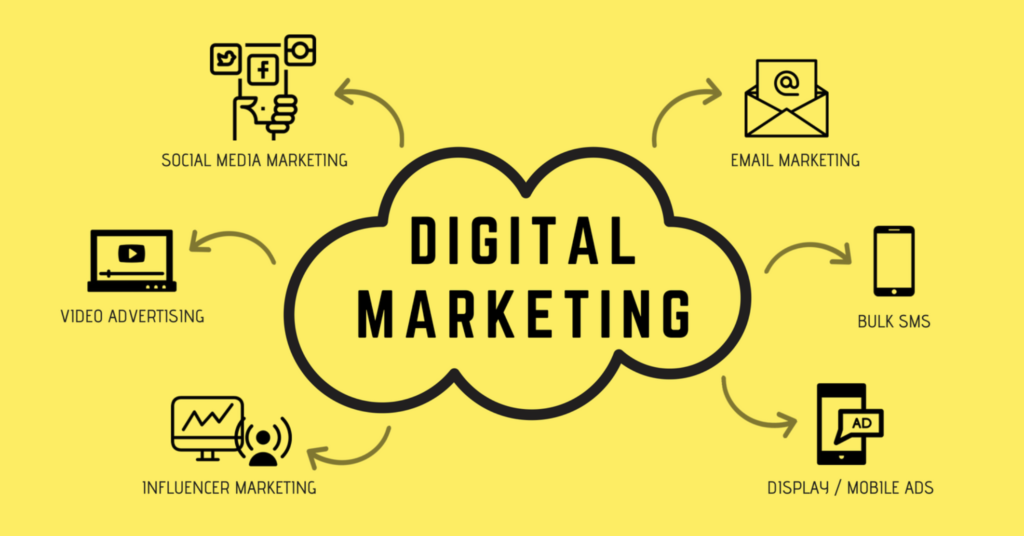
- Explanation of digital marketing and its key components.
- How digital marketing differs from traditional marketing.
- Importance of Digital Marketing in 2024:
- Digital transformation of businesses and how marketing has shifted to digital platforms.
- Core Components of Digital Marketing:
- SEO, SEM, social media, email marketing, content marketing, and more.
Chapter 2: The Fundamentals of SEO :
- What is SEO?
- Explanation of SEO (Search Engine Optimization).
- Why SEO is crucial for driving traffic and growing your online presence.
- Types of SEO:
- On-Page SEO: Keyword optimization, meta descriptions, headings, etc.
- Off-Page SEO: Link-building, social signals, and guest blogging.
- Technical SEO: Site structure, mobile-friendliness, speed, etc.
- SEO Best Practices:
- How to choose the right keywords and optimize for them.
- The importance of creating high-quality content.
- Using tools like Google Analytics and SEMrush for SEO tracking.
Chapter 3: Social Media Marketing Mastery :
- The Power of Social Media:
- Why social media is vital for brand building and customer engagement.
- Overview of popular platforms: Facebook, Instagram, Twitter, LinkedIn, TikTok, and Pinterest.
- Developing a Social Media Strategy:
- How to define goals and create content strategies for different platforms.
- The importance of consistency and branding.
- Engaging with your audience: Responding to comments, direct messages, and sharing user-generated content.
- Paid Social Media Advertising:
- Understanding Facebook Ads, Instagram promotions, LinkedIn Ads, etc.
- Budgeting, targeting, and ad optimization strategies for the best ROI.
Chapter 4: Content Marketing and Storytelling :
- What is Content Marketing?
- The role of content in attracting and retaining customers.
- Types of content: Blogs, videos, podcasts, infographics, and eBooks.
- Content Creation and Strategy:
- How to create a content calendar.
- Tips for writing engaging blog posts and articles.
- How to develop a video marketing strategy.
- Storytelling in Content Marketing:
- The importance of crafting compelling stories that resonate with your audience.
- Examples of successful brand storytelling.
- Measuring Content Performance:
- Tools to track content performance (Google Analytics, social media insights, etc.).
Chapter 5: Paid Advertising: Google Ads and Beyond :
- Introduction to Paid Advertising:
- How PPC (Pay-Per-Click) advertising works.
- The difference between organic and paid traffic.
- Google Ads Mastery:
- Setting up and running Google Ads campaigns: Keywords, targeting, and bidding strategies.
- Optimizing your Google Ads for conversions.
- Other Paid Platforms:
- Facebook Ads, LinkedIn Ads, Twitter Ads, and display advertising.
- Remarketing and retargeting campaigns to increase ROI.
Chapter 6: Email Marketing Success :
- Why Email Marketing is Important:
- The role of email in customer retention and conversion.
- Building and Segmenting Your Email List:
- How to collect emails ethically through lead magnets and landing pages.
- Email list segmentation: Why it matters and how to do it.
- Crafting Effective Email Campaigns:
- How to write compelling subject lines, copy, and CTAs (Calls to Action).
- Design tips: Mobile-friendly templates, personalization, and A/B testing.
- Analyzing Email Campaign Performance:
- Metrics to track: Open rates, click-through rates, and conversions.
- Tools like Mailchimp, HubSpot, and ConvertKit for managing email campaigns.
Chapter 7: Analytics and Measuring Success :
- The Importance of Analytics:
- How analytics help track performance, optimize campaigns, and drive ROI.
- Google Analytics Overview:
- How to set up and use Google Analytics.
- Key metrics to track: Traffic, bounce rate, session duration, conversions.
- Social Media Analytics:
- How to use Facebook Insights, Instagram Analytics, and Twitter Analytics to improve strategies.
- Data-Driven Decisions:
- How to adjust campaigns based on analytics data to improve results.
Chapter 8: Leveraging Marketing Automation :
- What is Marketing Automation?
- Explanation of marketing automation and its benefits.
- Tools for Automation:
- Popular platforms: HubSpot, Mailchimp, and ActiveCampaign.
- Setting Up Automated Campaigns:
- Email drip campaigns, social media scheduling, and behavior-based automation.
- Measuring Automation Success:
- How to track the effectiveness of automated campaigns and optimize them.
Chapter 9: Growing and Scaling Your Online Business :
- Building a Scalable Digital Marketing Strategy:
- How to scale campaigns once initial success is achieved.
- Expanding Reach Through Partnerships and Influencers:
- Working with influencers, affiliates, and brand partnerships.
- Automating and Outsourcing Tasks:
- When to automate tasks and hire experts to scale your business.
Chapter 10: The Future of Digital Marketing :
- Emerging Trends in Digital Marketing:
- AI in marketing, voice search, and conversational marketing.
- Adapting to Changes:
- The importance of staying updated and flexible in your strategies.
- Continuing Your Digital Marketing Education:
- Resources for ongoing learning: Online courses, podcasts, books, and industry blogs.
Conclusion :
- Recap of Key Points:
- Summary of the digital marketing strategies discussed in the guide.
- Final Thoughts on Mastering Digital Marketing:
- Encouragement to take action, experiment, and continually improve.
- Call to Action:
- Encourage readers to begin their digital marketing journey and implement what they’ve learned.

Title: Mastering the Art of Digital Marketing to Grow Online
Introduction :
- Why Digital Marketing Matters: The role of digital marketing in today’s business landscape.
- Digital Marketing Growth: How digital marketing helps businesses scale, increase visibility, and engage customers.
- Purpose of the Guide: A roadmap for mastering digital marketing to achieve online growth.
Chapter 1: Understanding Digital Marketing :
- What is Digital Marketing?
- Explanation of digital marketing and its key components.
- How digital marketing differs from traditional marketing.
- Importance of Digital Marketing in 2024:
- Digital transformation of businesses and how marketing has shifted to digital platforms.
- Core Components of Digital Marketing:
- SEO, SEM, social media, email marketing, content marketing, and more.
Chapter 2: The Fundamentals of SEO :
- What is SEO?
- Explanation of SEO (Search Engine Optimization).
- Why SEO is crucial for driving traffic and growing your online presence.
- Types of SEO:
- On-Page SEO: Keyword optimization, meta descriptions, headings, etc.
- Off-Page SEO: Link-building, social signals, and guest blogging.
- Technical SEO: Site structure, mobile-friendliness, speed, etc.
- SEO Best Practices:
- How to choose the right keywords and optimize for them.
- The importance of creating high-quality content.
- Using tools like Google Analytics and SEMrush for SEO tracking.
Chapter 4: Content Marketing and Storytelling :
- What is Content Marketing?
- The role of content in attracting and retaining customers.
- Types of content: Blogs, videos, podcasts, infographics, and eBooks.
- Content Creation and Strategy:
- How to create a content calendar.
- Tips for writing engaging blog posts and articles.
- How to develop a video marketing strategy.
- Storytelling in Content Marketing:
- The importance of crafting compelling stories that resonate with your audience.
- Examples of successful brand storytelling.
- Measuring Content Performance:
- Tools to track content performance (Google Analytics, social media insights, etc.).
Chapter 5: Paid Advertising: Google Ads and Beyond :
- Introduction to Paid Advertising:
- How PPC (Pay-Per-Click) advertising works.
- The difference between organic and paid traffic.
- Google Ads Mastery:
- Setting up and running Google Ads campaigns: Keywords, targeting, and bidding strategies.
- Optimizing your Google Ads for conversions.
- Other Paid Platforms:
- Facebook Ads, LinkedIn Ads, Twitter Ads, and display advertising.
- Remarketing and retargeting campaigns to increase ROI.
Chapter 6: Email Marketing Success :
- Why Email Marketing is Important:
- The role of email in customer retention and conversion.
- Building and Segmenting Your Email List:
- How to collect emails ethically through lead magnets and landing pages.
- Email list segmentation: Why it matters and how to do it.
- Crafting Effective Email Campaigns:
- How to write compelling subject lines, copy, and CTAs (Call to Action).
- Design tips: Mobile-friendly templates, personalization, and A/B testing.
- Analyzing Email Campaign Performance:
- Metrics to track: Open rates, click-through rates, and conversions.
- Tools like Mailchimp, HubSpot, and ConvertKit for managing email campaigns.
Chapter 7: Analytics and Measuring Success :
- The Importance of Analytics:
- How analytics help track performance, optimize campaigns, and drive ROI.
- Google Analytics Overview:
- How to set up and use Google Analytics.
- Key metrics to track: Traffic, bounce rate, session duration, conversions.
- Social Media Analytics:
- How to use Facebook Insights, Instagram Analytics, and Twitter Analytics to improve strategies.
- Data-Driven Decisions:
- How to adjust campaigns based on analytics data to improve results.
Chapter 8: Leveraging Marketing Automation :
- What is Marketing Automation?
- Explanation of marketing automation and its benefits.
- Tools for Automation:
- Popular platforms: HubSpot, Mailchimp, and ActiveCampaign.
- Setting Up Automated Campaigns:
- Email drip campaigns, social media scheduling, and behavior-based automation.
- Measuring Automation Success:
- How to track the effectiveness of automated campaigns and optimize them.
Chapter 9: Growing and Scaling Your Online Business :
- Building a Scalable Digital Marketing Strategy:
- How to scale campaigns once initial success is achieved.
- Expanding Reach Through Partnerships and Influencers:
- Working with influencers, affiliates, and brand partnerships.
- Automating and Outsourcing Tasks:
- When to automate tasks and hire experts to scale your business.
Chapter 10: The Future of Digital Marketing :
- Emerging Trends in Digital Marketing:
- AI in marketing, voice search, and conversational marketing.
- Adapting to Changes:
- The importance of staying updated and flexible in your strategies.
- Continuing Your Digital Marketing Education:
- Resources for ongoing learning: Online courses, podcasts, books, and industry blogs.
Conclusion:
- Recap of Key Points:
- Summary of the digital marketing strategies discussed in the guide.
- Final Thoughts on Mastering Digital Marketing:
- Encouragement to take action, experiment, and continually improve.
- Call to Action:
- Encourage readers to begin their digital marketing journey and implement what they’ve learned.
Additional Sections:
- Glossary of Digital Marketing Terms (Optional, but helpful for beginners).
- FAQs about Digital Marketing (Optional, to address common questions).
Creating a comprehensive article about digital marketing tools involves discussing a variety of platforms, software, and resources that can help businesses, marketers, and individuals execute their digital marketing strategies effectively. Here’s a detailed outline and breakdown of what such an article might look like:

Title: The Ultimate Guide to Digital Marketing Tools: Mastering Your Online Presence
Introduction:
- Importance of Digital Marketing Tools: The necessity of tools for managing campaigns, improving efficiency, and tracking success.
- Overview of the Tools: A brief introduction to various categories of digital marketing tools.
- Why You Need Digital Marketing Tools: Explanation of how tools help streamline processes, improve results, and save time.
Chapter 1: SEO Tools :
- Introduction to SEO Tools: The importance of SEO in digital marketing and how tools help businesses improve search engine rankings.
- Top SEO Tools:
- Google Analytics:
- Overview of Google Analytics and how it helps track website traffic and user behavior.
- Key features for SEO: Setting up goals, tracking landing pages, and conversions.
- SEMrush:
- Overview of SEMrush for keyword research, backlink analysis, and competitive analysis.
- How to use SEMrush to track keyword rankings and optimize your SEO strategy.
- Ahrefs:
- How Ahrefs helps with backlink research, keyword analysis, and competitor insights.
- Tools for site audits and tracking SEO performance.
- Moz Pro:
- Features like site audits, keyword tracking, and page optimization suggestions.
- Benefits of using Moz’s tools for on-page and off-page SEO.
- Yoast SEO (for WordPress):
- How Yoast SEO assists with on-page SEO optimization.
- Key features like readability checks, keyword optimization, and technical SEO recommendations.
Chapter 2: Social Media Marketing Tools :
- The Role of Social Media in Digital Marketing: Why social media marketing is essential and how tools can streamline processes.
- Top Social Media Marketing Tools:
- Hootsuite:
- Overview of Hootsuite for scheduling posts, tracking brand mentions, and analyzing performance.
- Benefits of using Hootsuite to manage multiple social media platforms in one dashboard.
- Buffer:
- Buffer’s features for scheduling posts, tracking engagement, and measuring campaign performance.
- How Buffer integrates with different social media channels for optimal posting.
- Sprout Social:
- Comprehensive social media management tool with analytics, scheduling, and monitoring.
- How to use Sprout Social for better team collaboration and detailed social insights.
- Canva:
- How Canva helps in creating social media graphics, infographics, and advertisements.
- Benefits of using Canva’s easy-to-use templates for marketers with little graphic design experience.
- SocialBee:
- SocialBee’s unique features for automating content categorization and posting for social media.
- How SocialBee helps schedule content and measure engagement.
Chapter 3: Content Marketing Tools :
- Why Content Marketing Matters: The connection between content and customer engagement in digital marketing.
- Top Content Marketing Tools:
- HubSpot:
- Overview of HubSpot’s content marketing tools for blogging, landing pages, and email marketing.
- How HubSpot helps businesses create and manage content while tracking performance.
- CoSchedule:
- How CoSchedule’s editorial calendar helps plan and organize content.
- Features like post-scheduling, content repurposing, and social sharing.
- BuzzSumo:
- BuzzSumo’s tools for content research, competitor analysis, and discovering trending topics.
- How BuzzSumo can help marketers create relevant, high-performing content.
- Grammarly:
- How Grammarly helps create polished and error-free content by checking grammar, spelling, and readability.
- The value of using Grammarly for content creators and marketers to maintain high standards.
- SurferSEO:
- How SurferSEO integrates content writing and SEO by analyzing top-ranking pages and suggesting improvements.
- Benefits for content creators focused on improving content SEO performance.
Chapter 4: Email Marketing Tools :
- Email Marketing’s Role in Digital Marketing: The power of email marketing in customer retention and conversion.
- Top Email Marketing Tools:
- Mailchimp:
- Overview of Mailchimp’s email marketing features, including automated campaigns, list segmentation, and reporting.
- How to use Mailchimp for effective email campaign management and performance tracking.
- ConvertKit:
- Key features of ConvertKit, like email list management, segmentation, and landing page creation.
- Benefits for bloggers, influencers, and small businesses in creating personalized email campaigns.
- ActiveCampaign:
- How ActiveCampaign offers advanced automation, email sequences, and CRM integration.
- Benefits for businesses looking to build targeted and automated email funnels.
- GetResponse:
- Overview of GetResponse features: email automation, landing pages, webinar integration.
- How GetResponse helps marketers optimize their email marketing strategies with A/B testing and analytics.
- Sendinblue:
- Overview of Sendinblue’s email marketing and SMS campaigns, along with automation and segmentation.
- How Sendinblue supports growing businesses in managing their customer relationships effectively.
Chapter 5: Analytics and Tracking Tools :
- The Importance of Analytics in Digital Marketing: How data drives decision-making and improves campaign performance.
- Top Analytics Tools:
- Google Analytics:
- A detailed guide to using Google Analytics for tracking website traffic, user behavior, and conversions.
- How Google Analytics helps in setting up goals, funnels, and tracking performance metrics.
- Hotjar:
- Overview of Hotjar’s heatmaps, session recordings, and user feedback tools.
- How to use Hotjar to improve website user experience and conversion rates.
- Mixpanel:
- How Mixpanel focuses on user analytics for web and mobile apps, offering advanced segmentation and tracking features.
- Benefits of using Mixpanel for analyzing customer behavior and product usage.
- Kissmetrics:
- Overview of Kissmetrics for customer behavior tracking and analytics.
- How Kissmetrics helps marketers optimize conversion funnels and customer acquisition.
- Crazy Egg:
- How Crazy Egg’s heatmaps and user session recordings can enhance conversion optimization efforts.
- A look at Crazy Egg’s A/B testing features for landing page optimization.
Chapter 6: Marketing Automation Tools :
- The Need for Automation in Digital Marketing: How automation helps streamline tasks, save time, and boost efficiency.
- Top Marketing Automation Tools:
- HubSpot Marketing Hub:
- Overview of HubSpot’s marketing automation tools, including email workflows, social media scheduling, and lead management.
- Marketo:
- Features of Marketo for enterprise-level marketing automation, including lead nurturing, email marketing, and reporting.
- Pardot (Salesforce):
- Pardot’s focus on B2B marketing automation, including lead generation, scoring, and CRM integration.
- Autopilot:
- How Autopilot allows users to create visual workflows for automating marketing campaigns across email, social, and more.
- Ontraport:
- Ontraport’s all-in-one marketing automation platform designed for entrepreneurs, with CRM, email, and landing page features.
Chapter 7: Graphic Design and Visual Content Tools :
- The Importance of Visual Content: Why images, graphics, and video play a crucial role in digital marketing.
- Top Graphic Design Tools:
- Canva:
- Overview of Canva’s templates, design features, and ease of use for marketers and business owners.
- Adobe Creative Cloud (Photoshop, Illustrator, etc.):
- Professional-grade tools for advanced graphic design and visual content creation.
- Crello:
- How Crello offers an alternative to Canva with similar features for creating visuals, including animations and video content.
- Fotor:
- Overview of Fotor’s tools for photo editing, design, and making visual content for marketing campaigns.
- Piktochart:
- Piktochart’s infographic maker and how it helps marketers create visual reports and presentations.
Conclusion :
- Recap of Key Tools: A brief summary of the essential tools for each area of digital marketing.
- How to Choose the Right Tool for Your Business: Tips for selecting the best tools based on business needs, size, and goals.
- Continuous Learning: Encouragement to stay updated with new tools and trends in digital marketing.